Petronesia
Simplifies corporate content management with news publishing, career listings, image uploads, and an integrated admin dashboard.
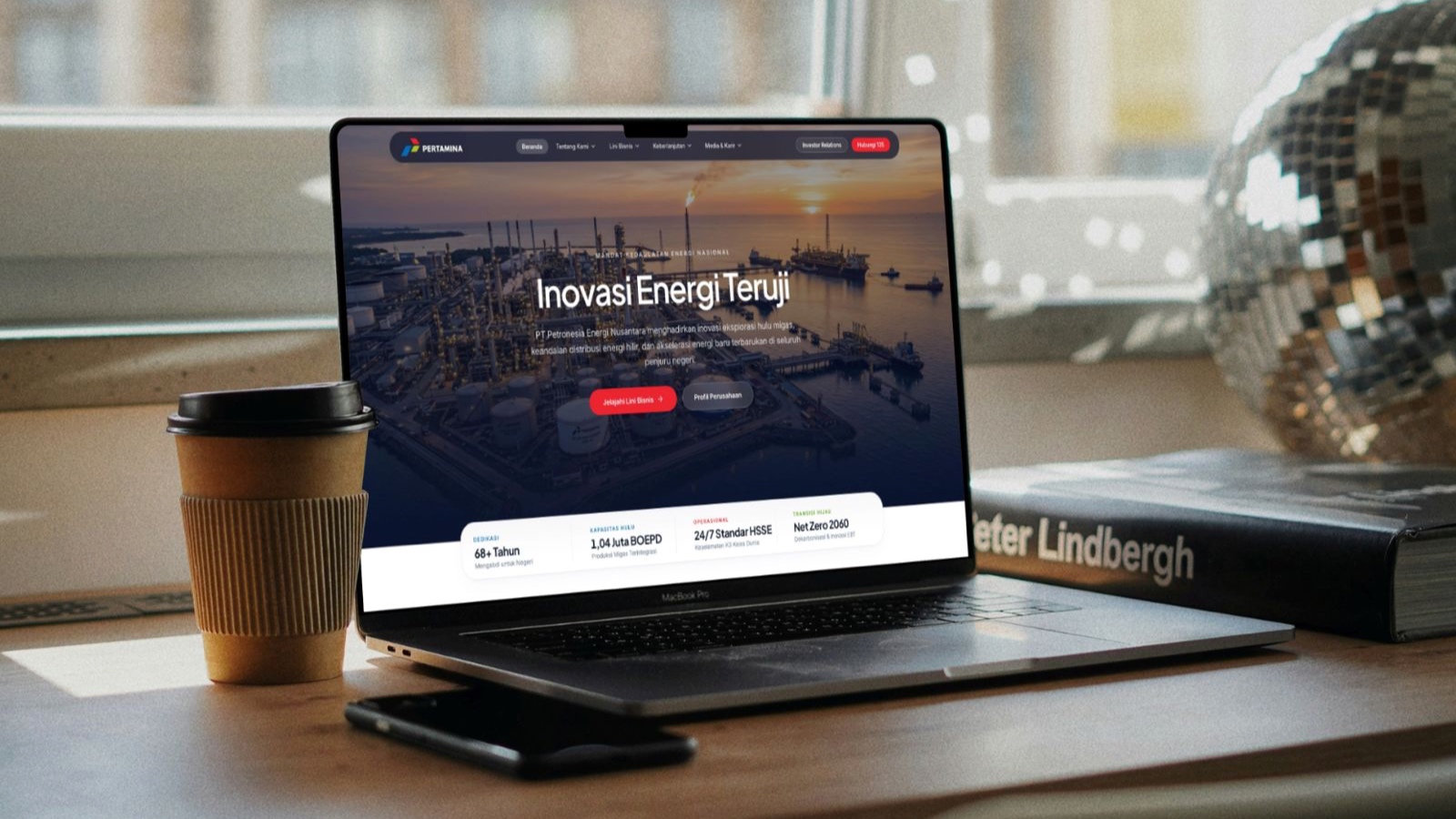
Petronesia — Company Profile & Content Management



A full-stack energy company website with an administrator dashboard for news, vacancies, page content, and image uploads. Built with Next.js and a Go REST API, with PostgreSQL for application data and Cloudinary for uploaded images.
Independent portfolio project inspired by Pertamina's corporate website. It is not an official Pertamina service. Company names, branding, and corporate material are used for demonstration.
Features
Public website
- Company profile, leadership, business divisions, sustainability, and investor relations pages.
- News and event listings with individual article pages.
- Career listings with vacancy details.
- Contact form connected to the API.
- Fuel reference prices with region and product-category filters, dated 1 October 2026. These are bundled frontend data, not current prices or database records.
- PGEO and PGAS stock charts fetched through the backend, with cached responses and updates delivered over Server-Sent Events (SSE). Availability and freshness depend on the upstream data source.
Administrator dashboard
- Create, edit, publish, and delete news and vacancies.
- Update page text and image URLs through a section-based CMS. Saves persist edited fields rather than copying all presentation defaults into the database.
- Upload JPG, PNG, WebP, and GIF images to Cloudinary. The API checks file contents, limits uploads to 5 MB, and rejects images above 40 million pixels.
- Review dashboard counts, recent audit activity, and contact submissions through the protected API.
- Sign in with JWT authentication, change passwords, and revoke existing sessions through token-version checks.
Data and startup behavior
The API creates its database tables with GORM when it starts. It does not seed administrators, news, vacancies, fuel prices, or other application records.
Static corporate copy and images remain available as presentation defaults. News and career sections show empty states when no records exist; API failures show errors instead of sample records. Contact submissions and administrator actions create records during normal use.
There are no default administrator credentials or public registration. The first account is created explicitly using a local command.
Architecture
The browser calls the Go API directly. CORS permits configured frontend origins, and the frontend's Content Security Policy derives its API origin from NEXT_PUBLIC_API_URL. Cloudinary credentials and database connection details stay on the backend.
Stock streaming is separate from CMS publishing: changes to news, vacancies, and page content are saved through REST endpoints and loaded through subsequent reads.
Publishing workflow
Tech stack
| Layer | Implementation |
|---|---|
| Frontend | Next.js 16 App Router, React 19, TypeScript 5 |
| Styling and animation | Tailwind CSS 4, Framer Motion, GSAP, Lucide icons |
| Typography | Locally bundled Inter and Plus Jakarta Sans |
| API | Go 1.26, Fiber v2 |
| Persistence | GORM, PostgreSQL in production; SQLite available locally |
| Authentication | JWT, bcrypt password hashing, token-version revocation |
| Image storage | Cloudinary Go SDK |
| Deployment | Vercel frontend, Render Docker service, Neon PostgreSQL |
Repository layout
.
├── frontend/
│   ├── src/app/              # Public pages and administrator routes
│   ├── src/components/       # Shared UI components
│   ├── src/lib/              # API client and frontend data helpers
│   ├── public/               # Static images and assets
│   ├── tests/                # Deployment behavior and packaging checks
│   └── Dockerfile
├── backend/
│   ├── cmd/bootstrap-admin/  # Explicit first-administrator setup
│   ├── cmd/migrate/          # Legacy local seeding utility
│   ├── config/               # Database initialization and CORS configuration
│   ├── controllers/          # HTTP handlers and stock-data integration
│   ├── middlewares/          # Authentication middleware
│   ├── models/               # GORM data models
│   ├── routes/               # API routes and request limits
│   └── Dockerfile
├── .env.example
├── docker-compose.yml
└── render.yaml
Local development
Requirements
- Go 1.26 or later.
- Node.js 22.6 or later and npm, including support for the test script's
--experimental-strip-typesflag. - PostgreSQL for administrator setup, or SQLite for browsing the public site locally.
- Docker with Compose if using the container setup.
- A Cloudinary account if testing uploads.
1. Clone the repository
git clone https://github.com/RPriago/Company-project-redesign.git
cd Company-project-redesign
2. Start a local PostgreSQL database
Use an existing development database, or create one with Docker:
docker run --name petronesia-postgres \
  -e POSTGRES_USER=petronesia \
  -e POSTGRES_PASSWORD=local-development-only \
  -e POSTGRES_DB=petronesia \
  -p 5432:5432 \
  -v petronesia-postgres-data:/var/lib/postgresql/data \
  -d postgres:17
These credentials are for local development only. Use an unused host port if 5432 is already occupied, and update the connection URL accordingly.
3. Configure and start the backend
cd backend
cp ../.env.example .env
Edit backend/.env:
APP_ENV=development
PORT=8080
DATABASE_URL=postgresql://petronesia:local-development-only@localhost:5432/petronesia?sslmode=disable
JWT_SECRET=replace-with-a-random-secret
ALLOWED_ORIGINS=http://localhost:3000
# Optional; required for image uploads:
# CLOUDINARY_URL=cloudinary://API_KEY:API_SECRET@CLOUD_NAME
Generate a secret with openssl rand -hex 32, then use its output as JWT_SECRET.
go run .The backend reads .env from its working directory. Its health endpoint is localhost:8080/api/health.
4. Create the first administrator
In another terminal, from backend/, export the same local database URL:
export DATABASE_URL='postgresql://petronesia:local-development-only@localhost:5432/petronesia?sslmode=disable'
go run ./cmd/bootstrap-admin --username owner --name "Portfolio Owner"
The command prompts for a password and confirmation without echoing either. It creates a superadmin and refuses to run if an administrator already exists. Passwords must contain 8–72 bytes.
Unlike API startup, this command requires an exported DATABASE_URL; it does not load backend/.env. For a deployed database, supply the connection string through your local environment without committing it or sharing it in logs.
5. Start the frontend
From the repository root:
cd frontend
npm ci
Create frontend/.env.local:
NEXT_PUBLIC_API_URL=http://localhost:8080/apinpm run devOpen localhost:3000. Administrator sign-in is at localhost:3000/admin/login.
Docker Compose alternative
To browse the public site with a persistent local SQLite database:
cp .env.example .env
# Set JWT_SECRET in .env before starting.
docker compose up --build -d
The frontend runs on port 3000, and the API runs on port 8080. Compose stores SQLite data in the backend_data named volume. This setup creates no administrator; use the PostgreSQL setup above when testing the admin workflow. The bootstrap command is excluded from runtime images.
Deployment configuration
| Service | Settings |
|---|---|
| Vercel | Root directory: frontend; install: npm ci; build: npm run build |
| Render | Dockerfile: backend/Dockerfile; Docker context: backend; health check: /api/health |
| Neon | PostgreSQL connection URL with TLS enabled |
| Cloudinary | API environment URL supplied only to Render |
Frontend variable — Vercel
NEXT_PUBLIC_API_URL=https://company-project-redesign.onrender.com/apiUse the exact key NEXT_PUBLIC_API_URL. This is a public URL, so Vercel's Config type is appropriate. Set it for each deployed environment that needs API access. Redeploy the frontend after changing it: the URL is included during the build.
Backend variables — Render
APP_ENV=production
PORT=8080
DATABASE_URL=postgresql://USER:PASSWORD@HOST/DATABASE?sslmode=require
JWT_SECRET=YOUR_RANDOM_SECRET
ALLOWED_ORIGINS=https://company-project-redesign-two.vercel.app
CLOUDINARY_URL=cloudinary://API_KEY:API_SECRET@CLOUD_NAME
Replace the credential placeholders in the provider dashboard. ALLOWED_ORIGINS accepts comma-separated origins; use exact HTTPS origins without paths in production. Additional preview domains need their own allowed origins.
Production startup requires PostgreSQL and an explicit JWT secret. A failed PostgreSQL connection stops startup rather than creating a SQLite fallback. /api/health returns success only when the database responds; otherwise it returns HTTP 503.
Use a fresh database for an empty launch. Do not run the legacy backend/cmd/migrate utility against it: that command inserts demonstration data. Run the administrator bootstrap separately only when an account is needed.
The deployment configuration targets free provider tiers. Availability, quotas, and pricing remain subject to each provider's terms. Allow for a backend startup delay after Render inactivity. Uploaded images belong in Cloudinary rather than the container filesystem.
Verification
Backend:
cd backend
go test ./...
go test -race ./...
go build -o /tmp/petronesia-backend .
Frontend:
cd frontend
npm ci
npm run lint
npx tsc --noEmit --incremental false
npm run build
npm run test:deployment
Tests cover database initialization without seeding, explicit administrator bootstrap, authentication, stock-data handling, upload validation and provider outcomes, frontend empty states, CMS field changes, fuel reference data, and deployment exclusions. Fixtures belong in disposable test databases, not the deployed portfolio database.
The Docker ignore files and frontend .vercelignore exclude documentation, test sources, local database files, secrets, and operator utilities from deployment inputs. Private Markdown documentation is ignored by Git; README files remain publishable.
Troubleshooting
| Symptom | Check |
|---|---|
| Administrator login fails | Verify the first account exists, the frontend build uses the correct API URL, and Render permits the frontend origin. |
Browser requests localhost:8080 on the live site | Set NEXT_PUBLIC_API_URL in Vercel and redeploy. NEXT_API_URL is not read by the application. |
| Upload reports storage is not configured | Set CLOUDINARY_URL on Render and redeploy the backend. |
| Upload returns HTTP 502 | Check Render logs for image upload failed provider=cloudinary. The application redacts configured credentials from these diagnostics. |
| Fuel values do not match current prices | The page displays a dated reference dataset. Automatic database-writing fuel synchronization is disabled. |
| News or careers list is empty | Publish records through the admin dashboard. Startup deliberately inserts no sample content. |
Attribution
Inter and Plus Jakarta Sans are bundled with their respective Open Font License files under frontend/src/app/fonts/. Corporate trademarks and referenced material belong to their respective owners. This repository does not currently include a project-wide license.